

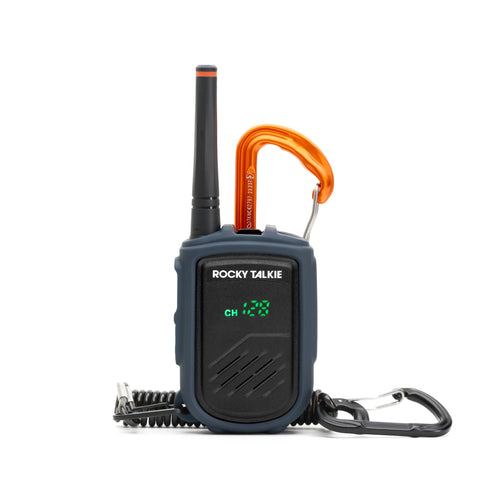


How do Privacy Codes work on a Rocky Talkie Adventure Radio?
| 6 min readThe last thing you want to hear when you're mid-pitch or seconds away from dropping is a channel full of chatter. Privacy codes will fix this.
Privacy codes, also known as sub-channels or CTCSS/DCS, are additional filters you apply to the standard channels 1-22 on FRS and GMRS radios. Once active, they filter out transmissions from other radios that aren't using the same code, ensuring that you only hear the transmissions intended for you.
Unlike the name implies, privacy codes do not establish a secret, encrypted frequency. So it’s important to note that, while you may only hear what you want, your transmissions can still be heard by anyone on the same main channel.
Privacy codes are critical in crowded areas, like when climbing in Yosemite Valley. You and your partner are on channel 3, but so is everyone else that day. Enabling a privacy code, for example, Channel 3 Privacy Code 1, lets your radio ignore all the other group transmissions and only open the speaker when someone on Channel 3 Privacy Code 1 chimes in. As radios have become more popular in adventure sports, finding an open channel is more important than ever. In practice, channel 3-1 is probably going to be busy too, so we recommend privacy codes 10 or higher for better chances.
For the Rocky Talkie Mountain Radio, we made finding an open channel even easier. If you use channels 23 through 128, these channels come with privacy codes active by default, just pick your channel, lock your radio, and you are good to go.
If you want to select your own privacy codes or match up with other brands of radios, the following is everything you need to know about setting privacy codes on the Rocky Talkie Mountain Radio and Expedition Radio.
When setting in privacy codes on Rocky Talkie Adventure Radios, look for the "CT" setting. This refers to "CTCSS/DCS," which stands for Continuous Tone-Coded Squelch System or Digital-Coded Squelch: two systems used to filter out unwanted background chatter and provide more "privacy" to a channel. Other radio brands may reference these terms too. Both indicate a form of coded squelch system and are often used interchangeably with "privacy codes," which is the main term used throughout this article.
Setting Privacy Codes on the Mountain Radio
Rocky Talkie Mountain Radios are designed to be easy-to-navigate FRS radios. So when you’re using Privacy Codes on these radios, it’s important to remember two things:
-
Channels 1-22 are standard FRS channels.
-
Channels 23-128 are unique to Rocky Talkie Mountain Radios in that they take the standard FRS channels 1-22 mentioned above and pre-apply a CTCSS/DCS privacy code. Therefore, they are still compatible across standard FRS channel and privacy code combinations, but they appear as a simplified, single channel option.
When transmitting between Mountain Radios, all you have to do is agree upon a channel with a preapplied privacy code and use the channel-flipper toggle at the top of the radio to dial in your settings.
Here's the step-by-step guide:
-
Power on the radio and unlock the channel setting mode if necessary by holding the channel flipper in the forward position.
-
Change your main channel by toggling the channel flipper (channels 1–22 are standard FRS channels shared with other radios).
-
Select your privacy code
-
For the simplest option when communicating to another Mountain Radio: Flip to channels 23 through 128. These are the Mountain Radio’s preset privacy code options. These channels use the same frequencies as channels 1 through 22 but come with a privacy code active by default. This means you can just navigate to the channel and lock it in without needing to fuss with any settings.
-
For a more manual option, hold down the volume minus (-)/CT button on the side panel. The CT setting will blink when it’s ready. You can now use the channel flipper to toggle to set a privacy code to the standard FRS channels 1-22 manually. Hold the volume minus (-) button down again to lock in the setting.
-
Lock it up. Once you've landed on your desired privacy code/channel combination, hold the channel flipper forward until the lock icon appears on the display screen. That locks your selection so nothing accidentally shifts while you're mid-ascent.
Pro Tip: If you’re syncing up with other radio brands, remember that Rocky Talkie’s Channels 23-128 are a selection of the standard Channels 1-22 with a privacy code preapplied. It’s easy to find the corresponding channel and privacy code combinations using our Offline Field Guide Radio Pairing Tool or on the Mountain Radio User Manual. You can download both guides to your phone for quick reference when off the grid.
Setting Privacy Codes on the Expedition Radio
Rocky Talkie Expedition Radios have a bit more going on under the hood, including a more powerful 5W output which elevates them to the GMRS radio category. On this more advanced radio, privacy codes appear as a secondary setting beside the standard Channels on the display screen.
The following is a guide to changing channel and privacy codes on the Expedition Radio:
-
Power on the radio and unlock the channel setting mode if necessary by holding the channel flipper in the forward position.
-
Change your main channel by toggling the channel flipper to the desired channel.
-
Navigate to the privacy code setting by holding down the volume minus (-)/CT button on the side panel. You will see the CT setting blink when it’s ready.
-
Select your privacy code using the channel flipper to toggle to the desired privacy code. Hold the volume minus (-)/ CT button down again to lock in the setting.
-
Lock it up. Once you see your desired channel and privacy code combo on the display screen, hold the channel flipper forward until the lock icon appears. Your screen is now locked to prevent accidental setting changes. Hold the channel flipper forward until the lock icon disappears to change channel settings.
Pro Tip: Download either the Rocky Talkie Offline Field Guide Radio Pairing Tool or the Expedition Radio User Manual before you hit the backcountry so you have channel pairings and radio setting tips while off the grid.
Similar to the Mountain Radio, the Expedition Radio is compatible with other radios. Just make sure your crew is set to the same channel and privacy code combination.
Dual Channel Monitoring on the Expedition Radio
The Expedition Radio also has a Dual Channel Monitoring mode that allows you to monitor two different channels, or channel/sub-channel combinations, simultaneously. This is huge when you want to keep a private channel open for your group while also monitoring a community or emergency channel.
Here’s how to set up the Expedition Radio’s Dual Channel Monitoring:
-
Power on and ensure your radio settings are unlocked by holding the channel flipper forward until the lock icon disappears from the display screen.
-
Turn on the Dual Channel Monitoring mode by holding down the A/B button on the side panel for two seconds. You’ll see A/B appear on the display screen.
-
Your Primary (A) Channel will automatically default to your current channel/privacy code combination.
-
Set your B Channel by holding the A/B mode button on the side panel. Once the display starts to flash, toggle the channel-flipper forward to dial in your channel. You can hold the CT (volume minus) button down to also set a sub-channel. Once you’re done, press any button and your B Channel is set.
-
Your radio will now listen to both lines, automatically opening the speaker when an incoming transmission is detected on either channel.
-
Transmitting:
-
The PTT button will always transmit on your primary A Channel by default.
-
To chime in on Channel B, simply press the A/B button once. This gives you a 6-second window to start your transmission before the radio resets back to the primary channel.
-
To turn off Dual Channel Monitoring press and hold the A/B side button. Once the display starts to blink, toggle the channel flipper backward and the display will read “OF”.
A Few Things Worth Knowing
Privacy codes do NOT mean encryption. Privacy codes filter what your radio is picking up. This means anyone dialed into the same main channel can still pick up your transmission.
Match up before you head out. Do a quick radio check in the parking lot. Confirm channel, confirm privacy code, and confirm battery life. It’ll take two minutes and save you from a lot of chaos when you need clear lines the most.
Compatibility matters. If you're linking up with another group using a different radio brand or establishing comms between a Mountain Radio and an Expedition Radio, make sure to have the Offline Field Guide downloaded. This will give you easy access to Rocky Talkie’s Radio Pairing Tool to help dial in channel combinations across radios.
Lock your radio. After you've got everything set, lock it. Simply hold the channel flipper forward until you see the lock icon. This will prevent any accidental setting swaps.
The Bottom Line
Privacy codes are a sure way to establish clear comms in a busy environment.
Get the channel matched. Get the privacy code matched. Lock it up. And enjoy the adventure.
Leave a comment (all fields required)
Comments will be approved before showing up.